← BOB App
Clients & Projects
Your team on the job
Team access for up to 3 people on Essentials, or up to 5 on Pro
Bring your crew into BOB on their own phones. They see their jobs and fill in their timesheets; you see every update — and they never see your prices, rates or wages.
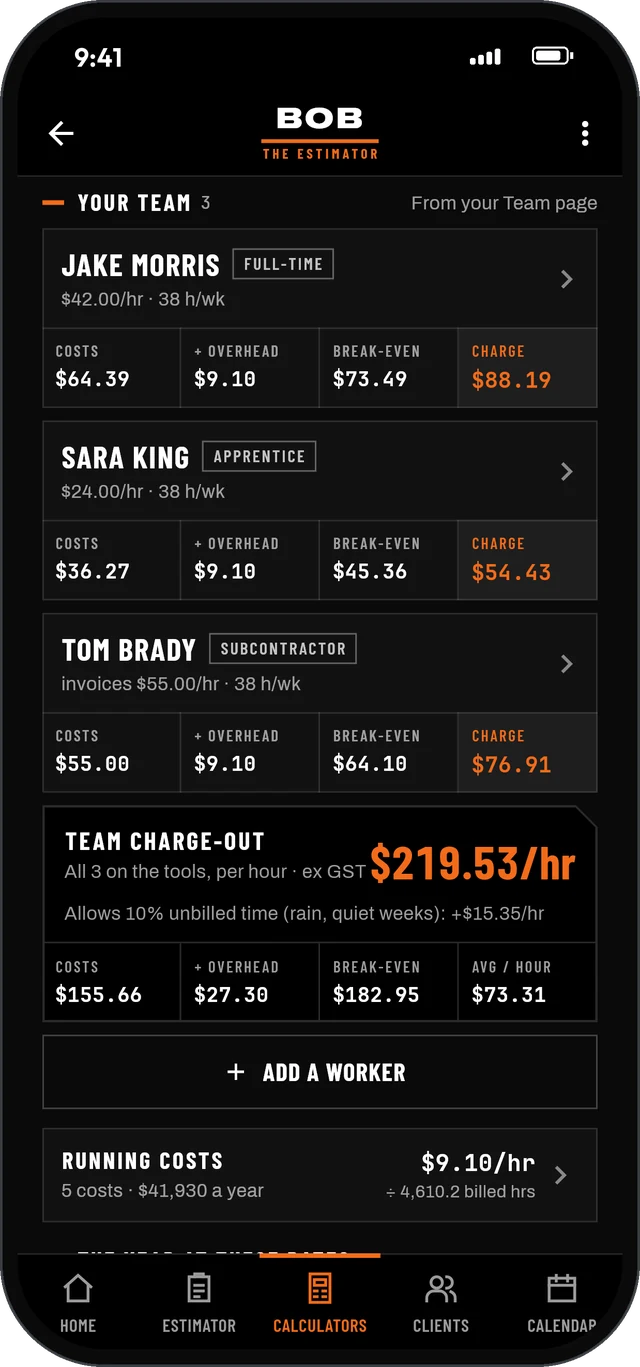
The Team page — your crew and their rates
- Add workers: name, position, email (for inviting them), employment type and contracted hours.
- Cost and charge-out: the pay rate (or what a contractor invoices you), hours, unbillable hours, working weeks, unpaid weeks off and super. BOB shows what each worker costs per hour worked, the break-even, and the charge-out with your markup — and warns you when a rate is under break-even.
- "Check with Wage & Expense calculator" opens Whole business at that worker.
- A colour for each worker on the calendar, and the projects they're assigned to — assigned workers fill the roster when the project is booked.
- The whole team per hour: cost, charge-out and margin.
Inviting a worker
- Send an invite by email. They sign in to BOB with that address — a free account, no subscription needed — and join. Copy the link if the email doesn't arrive, or withdraw an invite.
- If they signed in with a hidden Apple email, they can ask to join; you see the address and approve or decline.
- Your plan's places: 3 on Essentials, 5 on Pro. When the team is full, nobody new can be invited until a place frees up. Team access is not on Lite.
- Remove someone and they no longer see your jobs, notes or to-dos; their timesheets stay with you.
What a member sees — and never sees
- Their next jobs; the clients they're booked on (who and where, their schedule there, the job calendar, chat, to-dos, plans and photos); and Timesheets & leave.
- You choose what they can do with to-dos, and whether the job calendar is view only or editable (add, move and delete events). Only you use the main calendar and book workers.
- They never see prices, quotes, rates or wages — those stay with you. Their own BOB work stays their own.
Timesheets and leave
- Members fill in each day they worked and submit; leave requests are annual, sick or a day off, from and to, with a note.
- You approve timesheets week by week on the worker's page — every booked day is listed, so a missing timesheet is easy to spot — and approve leave, which goes on the calendar.
- Approved hours flow into wages and job costs.
Job chat and Messages
- A chat on each client for you and the team members on that job — live, with a dot on clients with something new.
- Send photos in the chat; they're saved to the client's Site photos.
- Copy a message, delete your own (the owner can delete any), report a message to the business owner, and mute a chat.
- Messages on Home puts every job chat in one place, newest first.
Notifications — Android and iPhone, for accounts on a team
- Members hear about new or changed jobs, chat messages, approved timesheets, leave decisions and to-dos assigned to them.
- Owners hear when timesheets and leave requests come in, and when a message is reported.
My business — the card on Home
- Waiting for you: timesheets and leave to approve.
- Your team, Messages, and rates and pricing: what to charge, Markup / Margin, pricing profiles, and hours and crew.
- The money: clients, won, declined, value, estimates, jobs in progress, and analytics and profit.
- What goes on your quotes: your details, logo, email templates and estimate templates.
On every paid plan
Clients, Projects and the Calendar are on Lite, Essentials and Pro. Team access is on Essentials (up to 3 people) and Pro (up to 5 people).