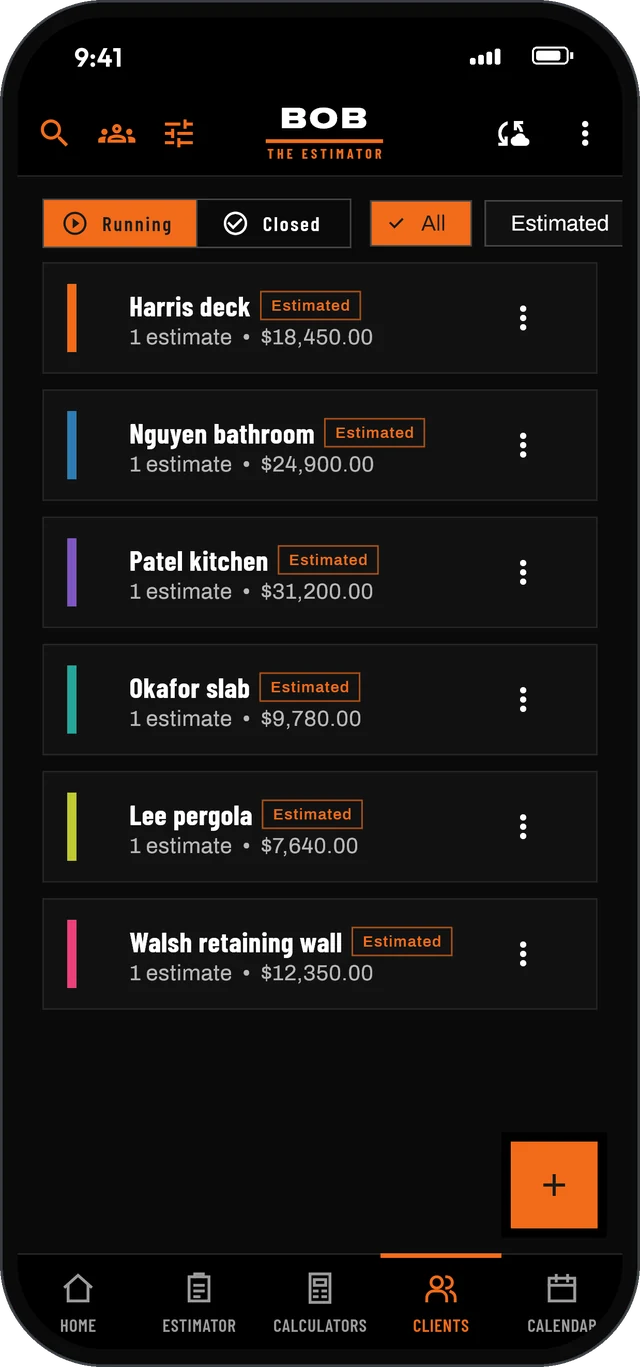
Your clients in one list — each in its own colour, with its estimates, hours and money — and the details you keep for each.
The list
- Every client in its own colour, picked when you add them and used on the calendar.
- Running and Closed views — close a job when it's finished, and reopen it any time.
- Filter by work type: All, Estimated or Hourly (a client with both shows under both).
- Each client shows its number of estimates, hours worked and money — quoted, booked and earned.
- Search your clients.
- A dot on any client with a new chat message.
- Duplicate, edit or delete a client (deleting removes its estimates too).
- Clients sync to the cloud when you're signed in, so they're on every device.
Adding a client
- The client name — for example "10 John Street" or "Smith Builders" — and an optional contact name, email, phone and address.
- How the work is priced:
- Priced estimates, or
- Hourly rate hire — billed by the hour, no estimate needed — with an optional charge-out rate for the client that overrides each worker's, and a warning if it's under break-even.
- Set the price myself: a quoted price that replaces the estimate total in the headline (your estimates stay attached), with the price including GST or GST on top.
- A client colour.
On every paid plan
Clients, Projects and the Calendar are on Lite, Essentials and Pro. Team access is on Essentials (up to 3 people) and Pro (up to 5 people).